June 19th, 2026
Today I'm really excited to share some previews of the modelling at Telluride V2, as well as some of the new techniques being used, and the reasons behind them. Together, these represent a fundamental shift in the philosophy and methods used to develop assets for my sceneries.
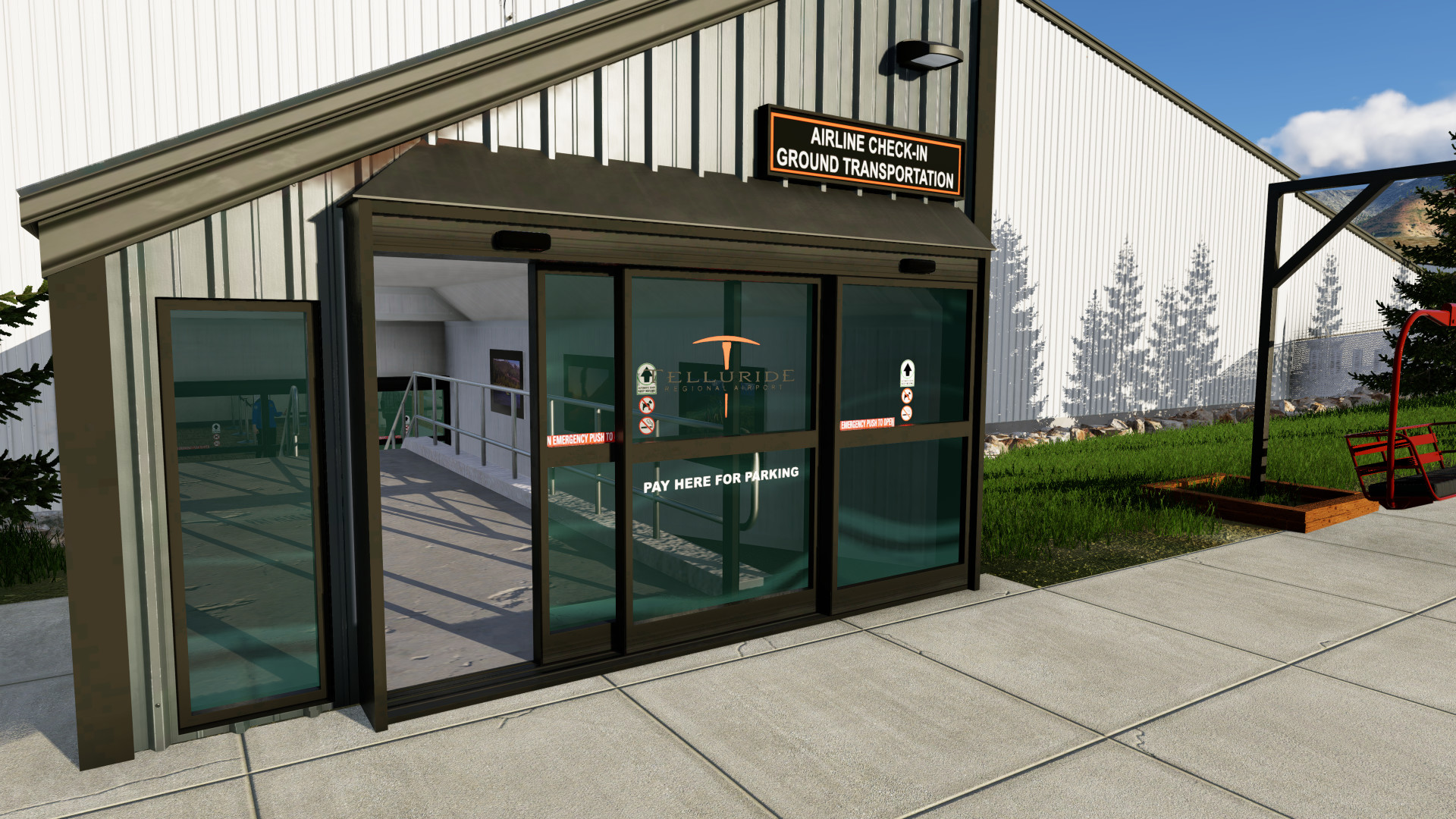
Attached Modular Objects
Traditionally, each model has one texture, and everything in that model shares a single texture even repeated elements, such as roof vents, door, handles, security cameras, etc. While this approach does have the advantage of using a single material (and therefore fewer shader changes, and better fps), it has three key disadvantages:
- Texture space for the same element is duplicated for every single texture, sometimes dozens of times per airport. I.e. that wall light on the utility shed uses a different texture than the one on a hangar, despite being identical.
- LODs of small elements are tied to the parent object LODs. Consider a terminal: Why should a security camera to the other end be drawn at the same detail as the one nearest to you? Yet because the LOD is tied to the whole object, that is what happens.
- These repeated elements must be textured by the developer for every single building, wasting time for meaningless repetitve work.
The answer to these limitations is to make each generic repeateable component it's own object, then attach them to a base X-Plane Autogen Point (.agp). This approach offers 3 key technical advantages:
- The model has it's own, tight independant LOD, saving geometry rendering load
- The model has it's own texture, used once, for all it's instances, ultimately saving VRAM
- It's much faster to model and texture something once and simply place it repeatedly.
For the final product, this means the scenery has higher FPS, uses less RAM/VRAM, attached models are far more detailed, and sceneries come out a bit faster.
So in practice, what does this look like? Well, take a look at some of these attached antennas, door handles, and lights:
Decal-First Texturing
One of the single most impactful features of X-Plane 12 for scenery developers is the addition of decals for objects. Decals allow you to have a texture that repeats at a higher frequency than the base texture, to add detail (think pebbles in a concrete texture).
Telluride V2's are built entirely around decals. I treat the base texture as a way to control colors, and large scale features such as leaks, dirt in crevases, etc. And I add details, such as corregation, stucco patterns, and brickwork with a decal. This enables a resolution that is far higher than anything I've ever shipped, with an exceptionally small VRAM footprint. In fact, including the library, at max resolution Telluride V2 consumes under 2.5GB VRAM at max resolution, dropping to roughly 700MB at high
Corrugation
You may have noticed in some of the shots that the corrugation on the siding and roofs is actually 3D. Traditionally, the issue with making corrugation 3D is performance (GPUs hate long thin faces, not just the number of faces), and artifacts such as shadows cast by the tiny faces, and aliasing.
I've solved these issue with 3 techniques:
- The corrugation uses the normals of the face it's extruded from, rather than the naturally calculated normals. In effect, they're shaded like they're not extruded. Instead, shading comes from the decal, allowing for less harsh lighting, and less aliasing
- The large flat face remains under the ridges, rather than a small face in between, this reduces the thin faces to be drawn by 25%. The ridges also have extremely short LODs, fading to the base texture as soon as you get beyond the distance you care.
- Shadows are disabled for just the ridges, the main roof still casts shadows.
Notice the results of flat, vs traditional 3D, vs my methods:
And my favorite part: It's all automated with a Blender script I wrote, so it can easily be included in future products!
Uniqueness
If we were to summarize this post, we'd likely come away with three themes: Detail, performance, and ease of development. But while the trend here is to better utilize generic assets, and speed up development with scripting, the amount of unique details, and the effort put in, are not decreasing, quite the contrary actually!
Telluride V2 includes more unique details than any of my other products - every detail I've photographed or found references for is included, from parking lot signage, to access gate numbers, to photos on the walls of the terminal, to the statue at the enterance, it's all there, so Telluride feels just like you're really there!
Performance
With all the focus on performance, how does Telluride stack up to default? Well, see for yourself!
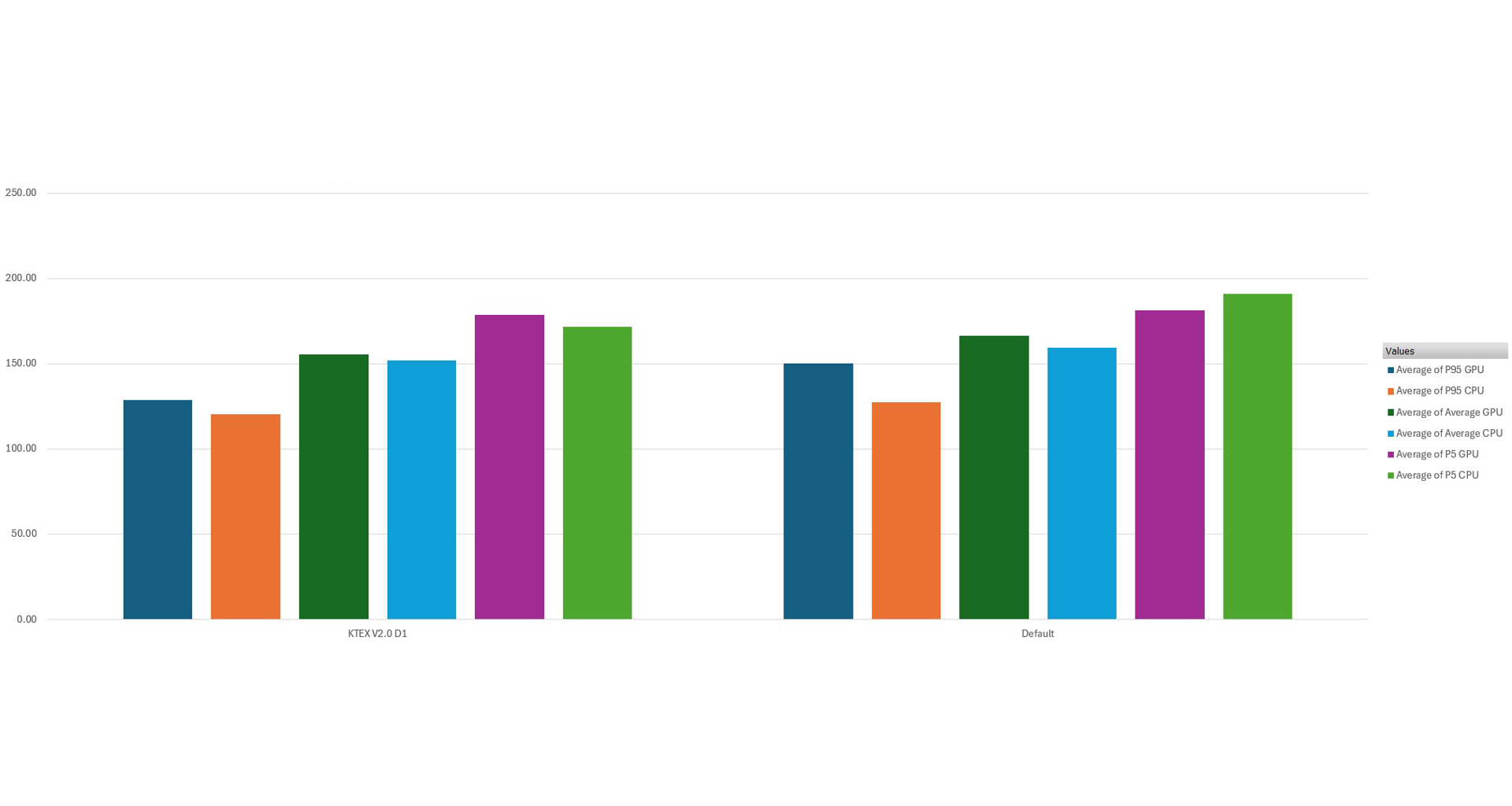
On the 95th percentile lows, KTEX maintains 85% and 94% of the default sim's performance for the GPU and CPU respectively, and on average, 93% and 95% of default performance for the CPU and GPU respectively!
When???
I've made the mistake of providing a release date enough times, so I won't repeat that, but I will say I'm super excited for you guys to be using KTEX V2 soon!
What's left is:
- Some more detail assets (as you may have seen, several antennas were missing)
- Misc polishing, such as pavement edges
- The biggest one: **LST 2.0**. Telluride V2 will rely on LST V2.0, which will have some other goodies as well, including a full web editor for developers.